Object Identifiers
Identifiers are used throughout OpenBoxes as a way to uniquely identify some entity without needing to rely on the internal database id of the object.
For example, the product in the image below might have an id of 09f5e1167e544c20017e5a2483672b5d, which is too
long to display in the UI, so instead we generate and assign it a product code of 10002, which is much shorter.
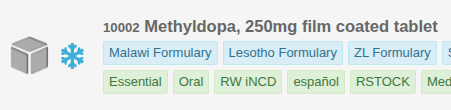
Many entities in OpenBoxes rely on identifiers, including: Transactions, Products, Suppliers, Organizations, and Orders.
Base Configuration
The format of an identifier is configurable via the following properties:
openboxes.identifier.default.format: The default format to use when generating an identifier. There are a number of keywords that you can use when specifying the format:\${random}: A randomly generated sequence as defined inrandom.template. See the section below for details.\${delimiter}: The separator character.\${sequenceNumber}: A sequential, incrementing number. See the section below for details.\${abbreviation}: An abbreviation of some field on the entity. See the section below for details.\${custom.*}: Adds a custom value to the identifier. See the section below for details.
openboxes.identifier.default.delimiter: The separator character to use between fields of the identifier. Is inserted whenever\${delimiter}appears in the format.openboxes.identifier.default.prefix.enabled: True if we allow prefix characters to be prepended to the identifier in certain scenarios. This type of prefix is specified in the code via the "prefix" context field and is meant to handle conditional logic. For example, we prepend "R-" to the identifier for replenishments but don't do so for regular orders. If you want an identifier to always have a prefix, you can specify it directly in the format. For example:openboxes.identifier.purchaseOrder.format = "PO-\${sequenceNumber}"
Warning
Remember that identifiers are meant to be unique, and so it is important that your format can generate unique values. We highly suggest you include at least one of the following to each format:
1) A random piece via \${random}
2) A sequential piece via \${sequenceNumber} (if the entity supports it)
3) A combination of custom or entity fields that are guaranteed to be unique
You can see our default property configurations in /grails-app/conf/runtime.groovy
Overriding Base Configuration
In case you don't want to use a single format across all of your entity types, most of the identifier configuration options can be overwritten at the feature level. To do so, simply replace "default" with the camelCase feature name of the entity you want to configure.
For example, if you have the following config:
openboxes.identifier.default.format: "\${random}"
openboxes.identifier.product.format: "\${sequenceNumber}"
openboxes.identifier.purchaseOrder.format: "PO-\${sequenceNumber}"
Randomization
Randomization can be added to the identifier by adding "\${random}" to the format. How the randomization is generated
can be configured in a number of ways:
openboxes.identifier.attempts.max: The maximum number of times to attempt to generate the random identifier before giving up and returning null. Useful in case we happen to generate a random value that already exists.openboxes.identifier.numeric: The set of characters to select from when populating theN(number) character in the random sequenceopenboxes.identifier.alphabetic: The set of characters to select from when populating theL(letter) character in the random sequenceopenboxes.identifier.alphanumeric: The set of characters to select from when populating theA(alphanumeric) character in the random sequenceopenboxes.identifier.default.random.template: A combination of 'N', 'L', and 'A' representing the structure of the random sequence. Any other characters will be kept as is. Ex: "-NNNLLL" will generate something like "-742JKD"openboxes.identifier.default.random.condition: Defines when to add the random piece of the identifier.- ALWAYS: The random sequence is always generated as a part of the identifier.
- ON_DUPLICATE: Only add a random sequence to the identifier if the identifier is not unique without it.
A config using randomization might look like:
openboxes.identifier.default.format: "\${random}"
openboxes.identifier.default.random.template: "NNNLLL"
openboxes.identifier.default.random.condition: RandomCondition.ALWAYS
Sequential Ids
A sequential, incrementing number can be added to the identifier by adding \${sequenceNumber} to the format. This
sequence number will be incremented whenever a new identifier is generated for the entity type so is useful when you
need to track the order that ids were generated in.
Note
For sequential ids to work, the entity must have a join on the "sequences" database table, which only a small subset of the entities do. As such, a majority of the entities cannot use sequential number in their identifier.
The format of the sequential number can be configured via:
- openboxes.identifier.default.sequenceNumber.minSize: The minimum number of digits in the identifier. Any number
smaller than this will be padded with zeroes. Ex: if minSize = 5, and we generate 13, it will output 00013.
Abbreviation
An abbreviation of a field can be added to the identifier by adding \${abbreviation} to the format. This can be
useful if you want your identifier to have a somewhat recognizable value.
For example, if given the string "Apple Berry Cherry", the resulting abbreviation would be "ABC". If your minSize = 4, then that wouldn't be enough characters so it will instead pull the first 4 characters of the string, resulting in the identifier being "APPL".
openboxes.identifier.default.abbreviation.minSize: The minimum number of characters in the abbreviationopenboxes.identifier.default.abbreviation.maxSize: The maximum number of characters in the abbreviationopenboxes.identifier.*.abbreviation.field: Which field of the entity to abbreviate
A config using abbreviation might look like:
openboxes.identifier.organization.format: "\${abbreviation}\${random}"
openboxes.identifier.organization.random.template: "-NNNLLL"
openboxes.identifier.organization.random.condition: RandomCondition.ON_DUPLICATE
openboxes.identifier.organization.abbreviation.field: "name"
Entity Fields
You can add the value of fields/properties of the entity to the identifier as long as the field implements the
toString() method.
To add an entity field you must add the field as a \${<field_name>} key in the format and specify a "properties"
map, with the key being the <field_name> you used in the format, and the value being the path to access the field.
For example:
openboxes.identifier.purchaseOrder.format: "\${name}\${sequenceNumber}"
openboxes.identifier.purchaseOrder.properties: ["name": "name"]
The field does not need to be directly on the entity that you're generating the identifier for. You can traverse entity relationships to get field values for the identifier.
For example:
openboxes.identifier.purchaseOrder.format: "\${destinationPartyCode}\${sequenceNumber}"
openboxes.identifier.purchaseOrder.properties: ["destinationPartyCode": "destinationParty.code"]
entity.destinationParty.code.
Custom Fields
Custom fields are specified by prefixing them with "custom." and are a way to add fields to the identifier that are not from the entity itself.
Note
The set of supported custom fields for an entity is defined in the code and must be directly provided in the context object when generating the identifier. As such, only some entities support custom fields, and adding a new custom field requires a code change.
For example, if you have the following config:
It will expect that the code provides a custom field "organizationCode" which will be used to populate the identifier. In this case, the result of this config is that the identifier of the supplier is the identifier of its organization.